
Team-CrackerS

Bine ai venit pe Blog-ul nostru !

Team-CraclerS

Noi gandim solutii pentru tine.

Team-CrackerS

Organization for educational purposes only.

Team-CrackerS

2007-2018

Team-CrackerS

Noi iti oferim ceea ce tu ai nevoie !

Se afișează postările cu eticheta Programe. Afișați toate postările

luni, 8 ianuarie 2018

Cuckoo Sandbox

[Image: Cuckoo+IV.png]

Cuco generates a handful of different raw data which include:

Native functions and Windows API calls fingerprints
Copies of files created and deleted file system
Dump the memory of the selected process
Dump full memory of the analysis machine
Desktop screenshots during execution of malware analysis
Dump network generated by the machine used for analysis

In order to put them to more consuming end users, Cuckoo is able to process and generate different types of reports, which could include:

JSON
Report HTML
Report MAEC Report
MongoDB
Interface HPFeeds interface

Even more interesting thanks to the extensive structure modular cuckoo, you are able to customize both processing and reporting stages. Cuco provides you with all the requirements to easily integrate the litter box into your existing frames and storage with the data you want, any way you want, with the format you want.
Changelog v1.1
  • Imphash Added to PE static analysis
  • Search High URLs in web interface
  • High search for PE Imphash in the web interface
  • High possibility in web interface to queue to all the machines
  • Filtered by category High behavior in the web interface Django
  • High registry analyzer to the web interface Django
  • High API REST to recover images associated with a task
  • High REST API to recover the PCAP associated with a task
  • High database migration utility
  • Added remote submission Added to submit.py utility
  • High utility small stats (utils / stats.py)
  • High PowerShell script analysis package
  • High configuration of overlap for signatures (data / signatures_overlay.json)
  • Fixed bug in MAEC report
  • Fixed package selection for Office documents and CPL scripts
  • Fixed problem with tcpdump filters
  • Fixed uncontrolled exception when loading files to scan engines
  • Fixed problems in CuckooMon that resulted in Internet Explorer crashes
  • Fixed bug in CuckooMon that caused mutual exclusions for be resolved as file paths
  • Fixed a bug in the behavior processing module which resulted in a backslash in the summary registry keys


Share:

Sandi Exploit Search Engine

[Image: The%20Sandi.png]

Sandi and open source project for search the exploits from exploit databases ...


Share:

Instagram - Simple Instagram Brute Force Script


Instagram-Py is a simple python script to perform basic brute force attack against Instagram ,
this script can bypass login limiting on wrong passwords , so basically it can test infinite number of passwords.
Instagram-Py is proved and can test over 6M passwords on a single instagram account with less resource as possible
This script mimics the activities of the official instagram android app and sends request over tor so you are secure, but if your tor installation is misconfigured then the blame is on you.
Depends on: python3 , tor , requests , requests[socks] , stem

Installation

using pip to get Instagram-py

Make sure you have got the latest version of pip(>= 9.0 and python(>= 3.6)
$ sudo easy_install3 -U pip # you have to install python3-setuptools , update pip
$ sudo pip3 install requests --upgrade
$ sudo pip3 install requests[socks]
$ sudo pip3 install stem
$ sudo pip3 install instagram-py
$ instagram-py # installed successfully
$ # Now lets copy the config file to your hard drive!
$ wget -O ~/instapy-config.json "https://git.io/v5DGy"


Configuring Instagram-Py
Open your configuration file found in your home directory , this file is very important located at ~/instapy-config.json , do not change anything except tor configuration
$ vim ~/instapy-config.json # open it with your favorite text editior!
The configuration file looks like this
{
 "api-url" : "https://i.instagram.com/api/v1/",
 "user-agent" : "Instagram 10.26.0 Android (18/4.3; 320dp..... ",
 "ig-sig-key" : "4f8732eb9ba7d1c8e8897a75d6474d4eb3f5279137431b2aafb71fafe2abe178",
 "ig-sig-version" : "4",
 "tor" : {
    "server" : "127.0.0.1",
    "port" : "9050",
    "protocol" : "socks5",
    "control" : {
          "password" : "",
          "port" : "9051"
      }
  }

}
api-url : do not change this unless you know what you are doing
user-agent : do not change this unless you know your stuff
ig-sig_key : never change this unless new release, this is extracted from the instagram apk file
tor : change everything according to your tor server configuration , do not mess up!


Configuring Tor server to open control port
open your tor configuration file usually located at /etc/tor/torrc
$ sudo vim /etc/tor/torrc # open it with your text editor
search for the file for this specific section
## The port on which Tor will listen for local connections from Tor
## controller applications, as documented in control-spec.txt.
#ControlPort 9051
uncomment 'ControlPort' by deleting the # before 'ControlPort' , now save the file and restart your tor server
now you are ready to crack any instagram account , make sure your tor configuration matched ~/instapy-config.json


Usage
Finally , now you can use instagram-py!
$ instagram-py your_account_username path_to_password_list


Share:

sâmbătă, 6 ianuarie 2018

FREE VPN!


CLICK HERE! FOR VPN SIGNUP

Create an Account
Confirm Email..
Press Claim Voucher..
Use Code
50GBFREE
Share:

ADRecon - Tool Which Gathers Information About The Active Directory


ADRecon is a tool which extracts various artifacts (as highlighted below) out of an AD environment in a specially formatted Microsoft Excel report that includes summary views with metrics to facilitate analysis. The report can provide a holistic picture of the current state of the target AD environment. The tool is useful to various classes of security professionals like auditors, DIFR, students, administrators, etc. It can also be an invaluable post-exploitation tools for a penetration tester. It can be ran from any workstation that is connected to the environment even hosts that are not domain members. Furthermore, the tool can be executed in the context of a non-privileged (i.e. standard domain user) accounts. Fine Grained Password Policy, LAPS and BitLocker may require Privileged user accounts. The tool will use Microsoft Remote Server Administration Tools (RSAT) if available, otherwise it will communicate with the Domain Controller using LDAP. The following information is gathered by the tool:
  • Forest;
  • Domains in the Forest and other attributes such as Sites;
  • Domain Password Policy;
  • Domain Controllers and their roles;
  • Users and their attributes;
  • Service Principal Names;
  • Groups and and their members;
  • Organizational Units and their ACLs;
  • Group Policy Object details;
  • DNS Zones;
  • Printers;
  • Computers and their attributes;
  • LAPS passwords (if implemented); and
  • BitLocker Recovery Keys (if implemented).

Getting Started
These instructions will get you a copy of the tool up and running on your local machine.

Prerequisites
  • .NET Framework 3.0 or later (Windows 7 includes 3.0)
  • PowerShell 2.0 or later (Windows 7 includes 2.0)

Optional

Installing
If you have git installed, you can start by cloning the repository:
git clone https://github.com/sense-of-security/ADRecon.git
Otherwise, you can download a zip archive of the latest release. The intent is to always keep the master branch in a working state.

Usage

Examples
To run ADRecon on a domain member host.
PS C:\> .\ADRecon.ps1
To run ADRecon on a domain member host as a different user.
PS C:\>.\ADRecon.ps1 -DomainController <IP or FQDN> -Credential <domain\username>
To run ADRecon on a non-member host using LDAP.
PS C:\>.\ADRecon.ps1 -Protocol LDAP -DomainController <IP or FQDN> -Credential <domain\username>
To run ADRecon with specific modules on a non-member host with RSAT.
PS C:\>.\ADRecon.ps1 -Protocol ADWS -DomainController <IP or FQDN> -Credential <domain\username> -Collect Domian, DCs
To generate the ADRecon-Report.xlsx based on ADRecon output.
PS C:\>.\ADRecon.ps1 -GenExcel C:\ADRecon-Report-<timestamp>
When you run ADRecon, a ADRecon-Report-<timestamp> folder will be created which will contain ADRecon-Report.xlsx and CSV-Folder with the raw files.

Parameters
-Protocol <String>
    Which protocol to use; ADWS (default) or LDAP

-DomainController <String>
    Domain Controller IP Address or Domain FQDN.

-Credential <PSCredential>
    Domain Credentials.

-GenExcel <String>
    Path for ADRecon output folder containing the CSV files to generate the ADRecon-Report.xlsx. Use it to generate the ADRecon-Report.xlsx when Microsoft Excel is not installed on the host used to run ADRecon.

-Collect <String>
    What attributes to collect (Comma separated; e.g Forest,Domain)
    Valid values include: Forest, Domain, PasswordPolicy, DCs, Users, UserSPNs, Groups, GroupMembers, OUs, OUPermissions, GPOs, DNSZones, Printers, Computers, ComputerSPNs, LAPS, BitLocker.

-DormantTimeSpan <Int>
    Timespan for Dormant accounts.

-PageSize <Int>
    The PageSize to set for the LDAP searcher object. (Default 200)

-Threads <Int>
    The number of threads to use during processing objects (Default 10)

-FlushCount <Int>
    The number of processed objects which will be flushed to disk. (Default -1 - Flush after all objects are processed).

Future Plans
  • Replace System.DirectoryServices.DirectorySearch with System.DirectoryServices.Protocols and add support for LDAP STARTTLS and LDAPS (TCP port 636).
  • Add Domain Trust Enumeration.
  • Gather ACLs for the useraccountcontrol attribute and the ms-mcs-admpwd LAPS attribute to determine which users can read the values.
  • Gather DS_CONTROL_ACCESS and Extended Rights, such as User-Force-Change-Password, DS-Replication-Get-Changes, DS-Replication-Get-Changes-All, etc. which can be used as alternative attack vectors.
  • Additional export and storage option: export to STDOUT, SQLite, xml, html.
  • List issues identified and provide recommended remediation advice based on analysis of the data.


Share:

vineri, 5 ianuarie 2018

SimpleWall - Simple tool to configure Windows Filtering Platform (WFP)


Simple tool to configure Windows Filtering Platform (WFP) which can configure network activity on your computer.
The lightweight application is less than a megabyte, and it is compatible with Windows Vista and higher operating systems. You can download either the installer or portable version. For correct working, need administrator rights.

Features:
  • Simple interface without annoying pop ups
  • Dropped packets notifications (Windows 7 and above)
  • Proxy support (Windows 8 and above) [BETA]
  • Internal blocklist (block Windows spy / telemetry)
  • Rules editor (create your own rules)
  • Free and open source
  • Localization support
  • IPv6 support
To activate portable mode, create "simplewall.ini" in application folder, or move it from "%APPDATA%\Henry++\simplewall". 

Share:

sAINT - A Spyware Generator for Windows systems written in Java


(s)AINT is a Spyware Generator for Windows systems written in Java.

Features
  • Keylogger
  • Take Screenshot
  • Webcam Capture
  • Persistence

Tested On
Kali Linux - ROLLING EDITION

How To Use
# Install dependencies (you need Maven and JDK 8 package installed)
$ apt install maven default-jdk default-jre openjdk-8-jdk openjdk-8-jre -y

# To generate a .EXE using launch4j are necessary the following packages
$ apt install zlib1g-dev libncurses5-dev lib32z1 lib32ncurses5 -y

# Clone this repository
$ git clone https://github.com/tiagorlampert/sAINT.git

# Go into the repository
$ cd sAINT

# Install and configure Maven libraries
$ sudo chmod +x configure.sh
$ ./configure.sh

# Run
$ java -jar sAINT.jar
E-mail will be sent when it reaches the specified number of characters. Optionally you can enable Screenshot, Webcam Capture and Persistence.

Screenshot

Maven dependencies

Generate spyware


Run

Install Java JRE 8

Run .EXE

or Run .JAR


Data

Local


How to uninstall
To uninstall run UNINSTALL.bat with administrative permissions.


Share:

EmbedInHTML - Embed and hide any file in an HTML file


What this tool does is taking a file (any type of file), encrypt it, and embed it into an HTML file as ressource, along with an automatic download routine simulating a user clicking on the embedded ressource.
Then, when the user browses the HTML file, the embedded file is decrypted on the fly, saved in a temporary folder, and the file is then presented to the user as if it was being downloaded from the remote site. Depending on the user's browser and the file type presented, the file can be automatically opened by the browser.

This tool comes in two flavors, providing the same overall functionnality but with some slight changes in the way of using it:
  1. An python script which generates the output HTML file based on a template, using RC4 encryption routines, and embedding the decryption key within the output file. The resulting HTML can either be browsed by the targeted user or sent as an attachement.
  2. An HTML/Javascript that you can drag the file into be encrypted to, which generates the output HTML file, using the WebCrypto API, but NOT embedding the decryption material (key and counter). Instead, the decryption material is displayed as a set of URL parameters to be added into a URL pointing to the HTML resulting file:
    http(s)://hosting.server.com/result.html#hexencodedkey!hexencodedcounter
    . So the resulting HTML file cannot be sent as an attachment. The main advantage of this technique is that the decryption material is not embedded into the file itself, hence preventing analysis and even retrieval of the payload by any system which doesn't have the full URL (eg: intercepting proxy)
Side notes:

Usage
Few payload examples files are provided in the payloads_examples directory. For instance the
calc.xll is an Excel add-in (XLL) file that contains a metasploit shellcode for x86 processes to launch the calc.exe process.

Using the python script
1/ Generate the malicious html file from the XLL file, along with a secret key:
python embedInHTML.py -k mysecretkey -f example_calc.xll -o index.html

2/ Expose the html file on a web server (one can be optionnaly started for you with the-w flag)

Using the HTML/Javascript
1/ Open the embedInHTML.html file within a browser
2/ Simply drag the payload file into the page (you can optionnaly change the output file name)
3/ Save the resulting file and take note of the decryption material as URL parameters to be added to the file name in the form:
http(s)://hosting.server.com/result.html#hexencodedkey!hexencodedcounter

Eventually...
Point the target's browser to the html file and let the magic happen:


Share:

Cr3dOv3r v0.2 - Know The Dangers Of Credential Reuse Attacks


Your best friend in credential reuse attacks.
Cr3dOv3r simply you give it an email then it does two simple jobs (but useful) :
  • Search for public leaks for the email and if it any, it returns with all available details about the leak (Using hacked-emails site API).
  • Now you give it this email's old or leaked password then it checks this credentials against 16 websites (ex: facebook, twitter, google...) then it tells you if login successful in any website!

Imagine with me this scenario
  • You checking a targeted email with this tool.
  • The tool finds it in a leak so you open the leakage link.
  • You get the leaked password after searching the leak.
  • Now you back to the tool and enters this password to check if there's any website the user uses the same password in it.
  • You imagine the rest

Screenshots


Usage
usage: Cr3d0v3r.py [-h] email

positional arguments:
  email       Email/username to check
a
optional arguments:
  -h, --help  show this help message and exit

Installing and requirements

To make the tool work at its best you must have :
  • Python 3.x.
  • Linux or windows system.
  • The requirements mentioned in the next few lines.

Installing
+For windows : (After downloading ZIP and upzip it)
cd Cr3dOv3r-master
python -m pip install -r win_requirements.txt
python Cr3dOv3r.py -h
+For linux :
git clone https://github.com/D4Vinci/Cr3dOv3r.git
chmod 777 -R Cr3dOv3r-master
cd Cr3dOv3r-master
pip3 install -r requirements.txt
python Cr3dOv3r.py -h
If you want to add a website to the tool, follow the instructions in the wiki

Contact
  • Twitter

Share:

WebDavC2 - A WebDAV C2 Tool


WebDavC2 is a PoC of using the WebDAV protocol with PROPFIND only requests to serve as a C2 communication channel between an agent, running on the target system, and a controller acting as the actuel C2 server.

Architecture
WebDavC2 is composed of:
  • a controller, written in Python, which acts as the C2 server
  • an agent, written in C#/.Net, running on the target system, delivered to the target system via various initial stagers
  • various flavors of initial stagers (created on the fly when the controller starts) used for the initial compromission of the target system

Features
WebDavC2 main features:
  • Various stager (powershell one liner, batch file, different types of MS-Office macro, JScript file) - this is not limited, you can easily come up with your own stagers, check the templates folder to get an idea
  • Pseudo-interactive shell (with environment persistency)
  • Auto start of the WebClient service, even from an unprivileged user using the 'pushd' trick

Installation & Configuration
Installation is pretty straight forward:
  • Git clone this repository:
    git clone https://github.com/Arno0x/WebDAVC2 WebDavC2
  • cd into the WebDavC2 folder:
    cd WebDavC2
  • Give the execution rights to the main script:
    chmod +x webDavC2.py
To start the controller, simply type
./webDavC2.py
.

Compiling your own agent
Although it is perfectly OK to use the provided agent.exe, you can very easily compile your own executables of the agent, from the source code provided. You don't need Visual Studio installed.
  • Copy the
    agent/agent.cs
    file on a Windows machine with the .Net framework installed
  • CD into the source directory
  • Use the .Net command line C# compiler:
    • To get the standard agent executable:
      C:\Windows\Microsoft.NET\Framework64\v4.0.30319\csc.exe /out:agent.exe *.cs
    • To get the debug version:
      C:\Windows\Microsoft.NET\Framework64\v4.0.30319\csc.exe /define:DEBUG /out:agent_debug.exe *.cs


Share:

iOSRestrictionBruteForce - Crack iOS Restriction Passcodes with Python


This version of the application is written with Python programming language,which is used to crack the Restriction PassCode of iphone/ipad.

Brute Force
  1. Get the Base64 key and salt from the backup file in Computer.
  2. Decode the Base64 key and salt.
  3. Try from 1 to 9999 to with the pbkdf2-hmac-sha1 hash with passlib (passlib moudle need to be installed before:easy_install passlib)

How to Use
  1. Make sure to use Itunes to back up the ios device to Computer
  2. Run ioscrack.py
python ioscrack.py

DEPENDENCIES
This has been tested with Python 2.6 and 2.7.


Share:

Decodify - Detect And Decode Encoded Strings Recursively


Decodify - Detect And Decode Encoded Strings Recursively


Now lets pass this encoded string to Decodify:


Boom! Thats what Decodify does.

Supported Encodings and Encryptions
  • Caesar ciphers
  • Binary
  • Hex
  • Decimal
  • Base64
  • URL
  • FromChar
  • MD5
  • SHA1
  • SHA2

Decoding Caesar Cipher
You can supply the offest by --rot option or you can tell Decodify to decode for 1-20 offest by using --rot all

Installing Decodify
Download Decodify with the following command:

Now switch to Decodify directory and run the installer with this command:
cd Decodify && chmod +x ./setup.sh
Now you can run decodify by entering dcode in your terminal.


Share:

Free Call & SMS Anywhere


4 Method to send free SMS 

When there no social network the best way to chat with my friend was SMS, really sms was so cool way anytime, anywhere. But whatsapp,facebook and other social network just eat our SMS (inbox) box.Now days sim provider also make SMS so costly, before i send a SMS i think twice.
There is another way to SEND FREE SMS WORLDWIDE, using Internet sites. Have you ever used free SMS online text messaging service(SMS)? If yes, then you must have noticed that sometimes the service does not work for many sometime you found delay on getting or sending message and then you have to search for alternatives that offer similar features like a website free SMS.
Now there’s no need to search further because here in this article i have listed some of the best free SMS alternatives to send free SMS worldwide without requiring you to register, install any software on your computer/android, or requiring a single rs. All of these websites uses an easy to use web interface to send free SMS to any mobile number around the world.
afreesms alternatives
Afree sms
All you have to do is access the SMS messaging service website, select the country or country code of the SMS recipient, enter the recipient’s mobile number in the correct format, enter your message into the message box, input correct captcha code for verification, and then press the Send button. Rest of the task will be handled by the SMS messaging service website.

A free SMS Alternatives
Here we have listed the all the working free SMS alternatives that allows you to send free SMS to any mobile phone carrier around the worldwide. You can give a try to each of them one by one to check which SMS service is working for your targeted area.

01 : M Free SMS
M Free SMS is an online text messaging service provider whose services exists on the Internet since 2013. The website allows any user to send unlimited SMS messages to any mobile number around the world without any requirement to register or necessity to provide any personal detail.send free sms
The easy to use web interface of Free SMS service asks user to select a country name of the SMS recipient, enter the mobile phone number in given format, enter your message in under 130 characters, then complete the captcha verification, and then click on the “Send SMS” button to send the message.

How to Send Free SMS and Free Call in Worldwide?

Apart from providing free SMS sending services, this website also allows its users to receive SMS messages right onto the website through their web interface.

#02 – Pump SMS
Pump SMS is one of the most popular and trustworthy online messaging service that is actively providing its services to its users since 2011. This website promises to deliver your SMS message to any mobile phone numbers in over 200 countries.Sms worldwide with pump sms
The requirements for sending a SMS to a mobile number are identical to that of AfreeSMS. What varies is the character limit in the message body. Pump SMS will allow you to type no more than 100 characters in a single SMS.
To make their free short messaging service more reliable, the creators have provided two different servers for sending a SMS. So in case server number one is not working then you can use server number two to send your SMS.
Furthermore, Pump SMS have a number of other features too! Those includes multimedia messaging service, SMS receiving service, bulk messaging, mobile phone network lookup, and free calling to limited countries.

#03 – Slide SMS
Slide SMS is another reliable SMS messaging service that allows you to send free short messages to any local and international mobile phone number.slide sms
The messaging interface of Slide SMS is pretty much identical to the interface of other online SMS service providers. But it doesn’t require you to select recipient’s country but you need to enter the mobile phone number along with the country code.
Just like M Free SMS, the interface of Slide SMS also allows you to enter 130 characters in the SMS message box. This means, about 30 characters would be used by the messaging service for their own advertisement in the message footer.

#04 – Glob Fone
Glob Fone is the popular and reliable short messaging service that will allow you to conveniently send unlimited free SMS to any mobile phone number around the world. In addition to free SMS service, Glob Fone allows you to share file, video chat, and make free calls right from the Internet.glob phone
The interface Glob Fone provides is a little bit different from the others in this list. In the first step, you need to select the country of recipient and enter his/her mobile phone number. Once entered, click on the “Next” button to head over to the type message box. Then put a tick on “I’m not a bot” option. Now click on “Next” button to begin sending your SMS to your recipient.
The interface takes about sixty seconds to successfully send your message to the recipient. it will confirm you the name of recipient’s mobile network as well as the delivery status of your SMS message.
Interestingly, Glob Fone’s free SMS service will allow you to type up to 140 characters in your message. which is higher than any other messaging service featured in our list.
Stop…!  Now I am going to tell you some amazing free sites to make free online calls, so don’t wait for sms reply, just call any one using them.

Sites to Make Free Calls online
Call2Friends: is amazing site to make free calls online, at this time it is limited to only some countries but don’t worry it supports most of the countries including US, UK, Canada, India, Pakistan, etc
Ievaphone: is another free call service provider to make online calls they have less restrictions then call2friends, but both have time and countries restrictions, but don’t worry at the end of this article is a way to make unlimited free calls online with these services.
Hope this help, if not then freely comment below and I will try to figure out in seconds. Thanks 
Share:

Cloak ~ Backdoor Python Scripts

[Image: 68747470733a2f2f692e696d6775722e636f6d2f...4f2e706e67]

Cloak is a tool which allows you to backdoor Python scripts with a few neat little tricks for evasion.

Cloak generates a python payload via msfvenom and then intelligently injects it into the python script you specify.

To evade basic detection, Cloak breaks the payload into several parts and places it in different places in the code. If you want the victim to run your injected script as root, Cloak can handle that too. Cloak will be further upgraded in future to support a wide range of payloads, platforms and evasion techniques.

https://github.com/UltimateHackers/Cloak
Share:

Liphyra HTTP Botnet [ Loader & DDoS & Grabber ] + Source Code


http://image.ibb.co/fkWuSw/Li.png
http://image.ibb.co/dVusEb/Li_2.gif

Features:
GRABS:
Chrome
Filezilla
Firefox
Internet Explorer
Opera
Pidgin
Safari

DDoS:
Slowloris
HTTP-Flood
SYN-Flood
UDP-Flood


Download:
https://www.sendspace.com/file/cr2qvg
Share:

Testing TLS/SSL Encryption Anywhere on Any Port

testssl.sh is a free and open source, feature-rich command line tool used for checking TLS/SSL encryption enabled services for supported ciphers, protocols and some cryptographic flaws, on Linux/BSD servers. It can be run on MacOS X and Windows using MSYS2 or Cygwin.

Features of Testssl.sh

  • Easy to install and use; produces clear output.
  • Highly flexible, it can be used to check any SSL/TLS enabled and STARTTLS services.
  • Perform a general check or single checks.
  • Comes with several command line options for various categories of single checks.
  • Supports different output types, including colored output.
  • Supports SSL Session ID check.
  • Supports checking for multiple server certificates.
  • Offers absolute privacy, it’s only you who can sees the result, not a third party.
  • Supports logging in (flat) JSON + CSV format.
  • Supports mass testing in serial (default) or parallel modes.
  • Supports presetting of command line options via environment variables, and so much more.
Important: You should be using bash (which comes preinstalled on almost Linux distributions) and a newer OpenSSL version (1.0) is recommended for effective usage.

How to Install and Use Testssl.sh in Linux

You can install testssl.sh by cloning this git repository as shown.
# git clone --depth 1 https://github.com/drwetter/testssl.sh.git
# cd testssl.sh
After cloning testssl.sh, the general use case is probably just run the following command to run a test against a website.
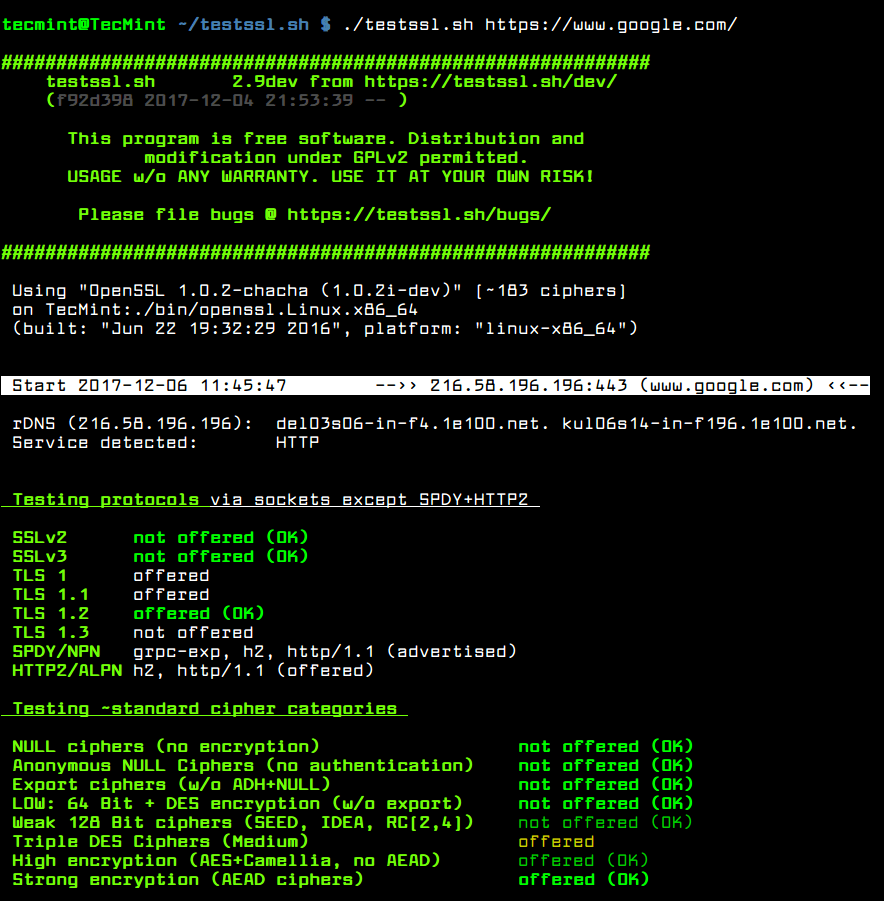
# ./testssl.sh https://www.google.com/
Test SSL TLS Encryption
To run a check against STARTTLS enabled protocols: ftp, smtp, pop3, imap, xmpp, telnet, ldap, postgres, mysql, use the -t option.
# ./testssl.sh -t smtp https://www.google.com/
By default, all mass tests are done in serial mode, you can enable parallel testing using the --parallel flag.
# ./testssl.sh --parallel https://www.google.com/
If you do not want to use the default system openssl program, use the –openssl flag to specify an alternative.
# ./testssl.sh --parallel --sneaky --openssl /path/to/your/openssl https://www.google.com/
You might want to keep logs for later analysis, testssl.sh has the --log (store log file in the current directory) or --logfile (specify log file location) option for that.
# ./testssl.sh --parallel --sneaky --logging https://www.google.com/
To disable DNS lookup, which can increase test speeds, use the -n flag.
# ./testssl.sh -n --parallel --sneaky --logging https://www.google.com/

Run Single Checks Using testssl.sh

You can also run single checks for protocols, server defaults, server preferences, headers, various types of vulnerabilities plus many other tests. There are a number of options provided for this.
For example, the -e flag enables you to check each local cipher remotely. If you want to make the test much faster, use include the --fast flag; this will omit some checks, in case you are using openssl for all ciphers, it only displays the first proffered cipher.
# ./testssl.sh -e --fast --parallel https://www.google.com/
The -p option allows for testing TLS/SSL protocols (including SPDY/HTTP2).
# ./testssl.sh -p --parallel --sneaky https://www.google.com/
You can view the server’s default picks and certificate using the -S option.
# ./testssl.sh -S https://www.google.com/
Next, to see the server’s preferred protocol+cipher, use the -P flag.
# ./testssl.sh -P https://www.google.com/
The -U option will help you test all vulnerabilities (if applicable).
# ./testssl.sh -U --sneaky https://www.google.com/
Unfortunately, we can not exploit all the options here, use the the command below to see a list of all options.
# ./testssl.sh --help
Find more at testssl.sh Github repository: https://github.com/drwetter/testssl.sh
Conclusion
testssl.sh is a useful security tool that every Linux system administrator needs to have and use for testing TSL/SSL enabled services. If you have any questions or thoughts to share, use the comment form below. In addition, you can also share with us any similar tools, that you have come across out there.
Share:

miercuri, 3 ianuarie 2018

Sandboxie


Please read and agree to the End-User License Agreement before downloading and installing the software.
Download: Sandboxie Installer (for Windows XP SP 3 through Windows 10; 32-bit + 64-bit) (~2.5 MB) (md5/sha1)

Download from this site


Upgrade: If you have an earlier version of Sandboxie already installed, you can let the installer upgrade (overwrite) your existing installation.
After installing Sandboxie, please review the Getting Started tutorial in the Help Topics page. You may also wish to consult Usage Tips. If you have any problems getting Sandboxie to work, please consult Known Conflicts first.
Share:

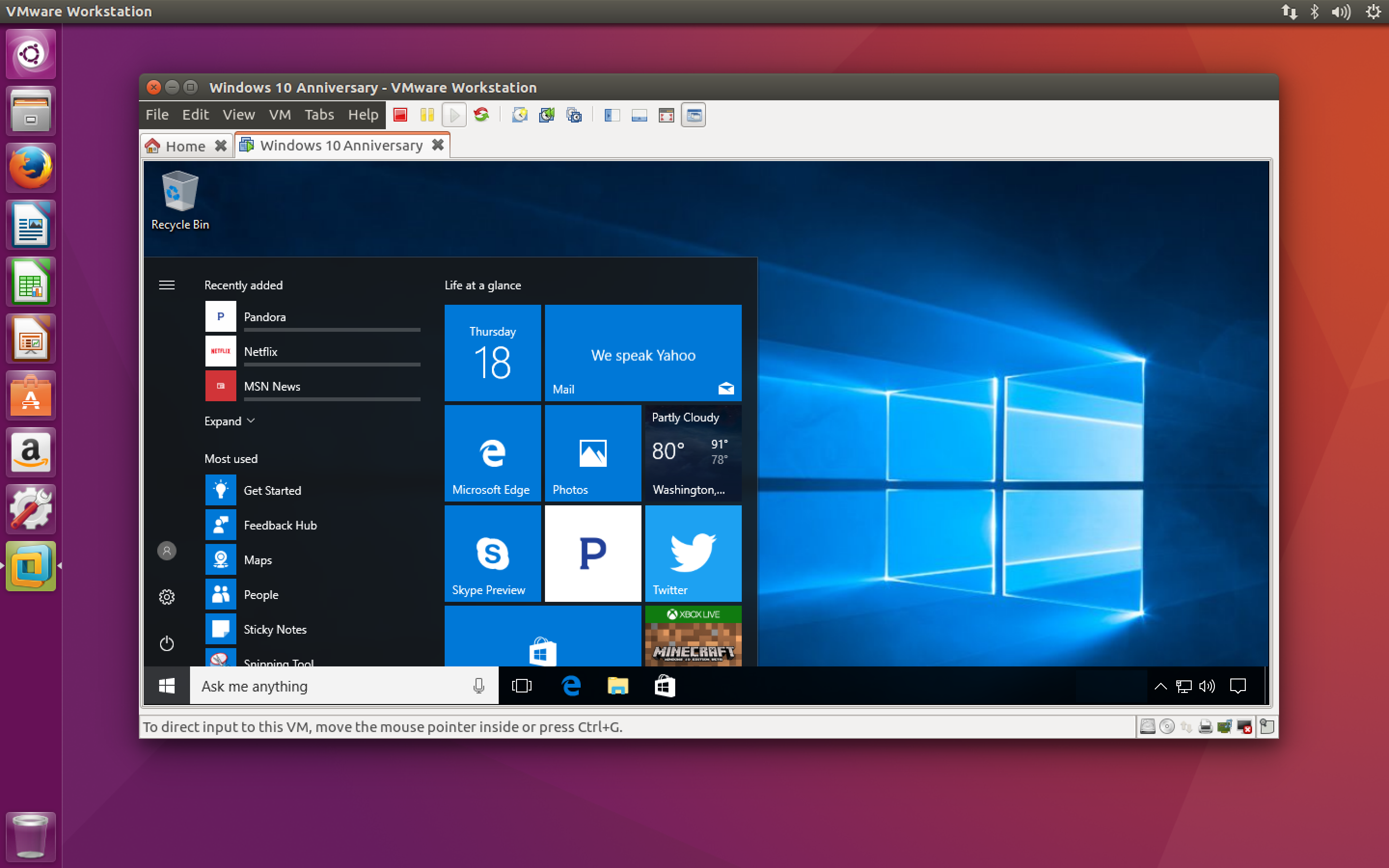
Vmware Tool


Recomandam acest program pentru folosirea tuturor programelor in siguranta

Este simplu de folosit ,aveti nevoie doar de imaginea (iso) a unui windows dorit
    VMware Workstation 14.1.0 Player for Windows 64-bit Operating Systems.
    (exe | 90.63 MB)


  • VMware Workstation 14.1.0 Player for Linux 64-bit.
    (bundle | 110.45 MB)


Download 86/64
Share:

marți, 2 ianuarie 2018

VPN Gate

Download

VPN Gate Client download (for Windows, freeware)

Simply install VPN Gate Client Plugin to SoftEther VPN Client. It will enable you to connect to any of our Public VPN Relay Servers of VPN Gate in a snap. It has a better throughput than L2TP, OpenVPN or SSTP. This program files are digitally signed by a certificate issued by GlobalSign. The binary file has a countersignature issued by Symantec.
  • How to Install and Use
  • Distributable Files
    This software is freeware. You may copy or redistribute the files you have acquired. You can upload the entire software to other websites. If your government's firewall exhibits problems, rendering www.vpngate.net (this web site) unreachable from your country, don't hestitate to distribute VPN Gate on websites in your country to help other users around you.
  • Note
    Make sure you use the latest version. Update VPN Gate Client to the latest version whenever your goverment's firewall exhibits strange errors disrupting VPN Gate's networks.
    Users are recommended to bookmark the mirror links shown here. Check it out if www.vpngate.net (this site) becomes unreachable due to strange errors your government's firewall may cause. VPN Gate Client Plug-in includes VPN Gate Relay Service. It is disabled by default. You can activate it manually.
  • About Anti-Virus software
    This program uses the networking functions of the operating system for its core VPN capability.
    Some anti-virus software or firewalls warn that such behavior might be dangerous.
    If your anti-virus software disrupts the VPN function, add the VPN program file or the installer to its whitelist.

SoftEther VPN Server download (freeware)

SoftEther VPN is a freeware developed at University of Tsukuba, Japan. High-performance VPN with the ultimate compatibilities to many devices. Windows, Mac, smartphones, tablets (iPhone, iPad, Android, Windows RT) and Cisco or other VPN routers are supported. SoftEther VPN also accepts OpenVPN and MS-SSTP VPN clients. For more details, visit http://www.softether.org/.
As described on How to Provide Your Computer as a VPN Server for VPN Gate, you can install SoftEther VPN Server and activate the VPN Gate Service (must be activated manually) to make your computer host a VPN service as a member of VPN Gate Academic Experiment.
  • Download SoftEther VPN Server
    Languages available: English, Japanese and Simplified Chinese
    Compatible OS: Windows, Linux, Mac OS X, FreeBSD and Solaris
Share:

Vulnerability Scanning with Nmap

Vulscan is a module which enhances nmap to a vulnerability scanner. The nmap option -sV enables version detection per service which is used to determine potential flaws according to the identified product. The data is looked up in an offline version of VulDB.

[Image: 687474703a2f2f7777772e636f6d70757465632e...742e706e67]

Vulnerability Database


There are the following pre-installed databases available at the moment:

Share:

Donate

Your donations are used to improve resources !!!


Important !!!

Fiecare fisier downloadat trebuie scanat inaintea utilizarii !!
Noi nu se asumam nici un fel de responsabilitate pentru descarcarile dvs.

Categorii

Exploits (21) News (2) Programe (86) Show off (1) Tutoriale (17)

Parteneri

Labels